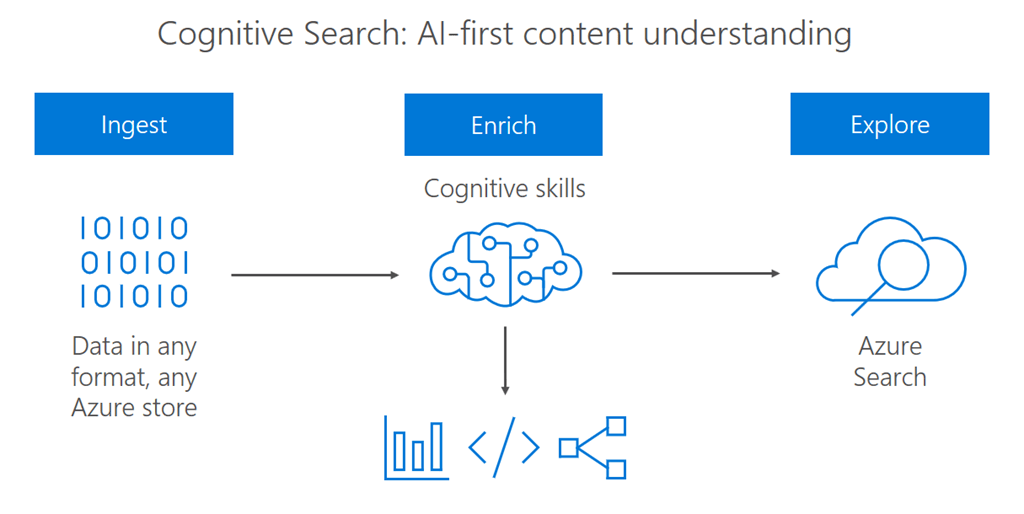
Azure AI Search (formerly Azure Cognitive Search) is a cloud search service that provides powerful full-text search, vector search, and AI-enrichment capabilities over your own content. It is the backbone of enterprise search scenarios, RAG (Retrieval-Augmented Generation) pipelines, and knowledge mining solutions.
What is Azure AI Search?
Azure AI Search is a fully managed search-as-a-service platform. It indexes your data—from Azure Blob Storage, Azure SQL, Cosmos DB, SharePoint, or custom sources—and exposes it through a rich REST API and SDK supporting:
- Full-text search with BM25 ranking.
- Vector search for semantic similarity.
- Hybrid search combining keyword and vector scores.
- AI enrichment via built-in and custom skills (OCR, translation, entity extraction).
- Semantic ranking powered by Microsoft's language models.
Core Concepts
| Concept | Description |
|---|---|
| Index | A persistent store of JSON documents with defined fields and their types |
| Indexer | Automated pipeline that pulls data from a data source into an index |
| Data Source | Connection to Azure Blob, SQL, Cosmos DB, etc. |
| Skillset | Chain of AI enrichment steps (OCR, NER, translation) |
| Semantic Configuration | Defines which fields participate in semantic ranking |
| Vector Profile | Configuration for vector similarity algorithm (HNSW, exhaustive KNN) |
Setting Up Azure AI Search
Step 1: Create a Search Service
- In the Azure Portal, go to Create a resource > AI + Machine Learning > Azure AI Search.
- Configure:
- Service name (must be globally unique).
- Resource group and region.
- Pricing tier: Free (F, for 3 indexes), Basic, Standard (S1–S3), Storage Optimized.
- Click Review + Create.
Step 2: Install the SDK
# Python
pip install azure-search-documents

# .NET
dotnet add package Azure.Search.Documents

# JavaScript
npm install @azure/search-documents
Creating and Populating an Index
Define an Index Schema
from azure.search.documents.indexes import SearchIndexClient
from azure.search.documents.indexes.models import (
    SearchIndex, SimpleField, SearchableField,
    SearchField, SearchFieldDataType, VectorSearch,
    HnswAlgorithmConfiguration, VectorSearchProfile
)
from azure.core.credentials import AzureKeyCredential

index_client = SearchIndexClient(
    endpoint="https://<your-service>.search.windows.net",
    credential=AzureKeyCredential("<your-admin-key>")
)

fields = [
    SimpleField(name="id", type=SearchFieldDataType.String, key=True),
    SearchableField(name="title", type=SearchFieldDataType.String),
    SearchableField(name="content", type=SearchFieldDataType.String),
    SimpleField(name="category", type=SearchFieldDataType.String, filterable=True, facetable=True),
    SearchField(
        name="contentVector",
        type=SearchFieldDataType.Collection(SearchFieldDataType.Single),
        searchable=True,
        vector_search_dimensions=1536,
        vector_search_profile_name="myHnswProfile"
    )
]

vector_search = VectorSearch(
    algorithms=[HnswAlgorithmConfiguration(name="myHnsw")],
    profiles=[VectorSearchProfile(name="myHnswProfile", algorithm_configuration_name="myHnsw")]
)

index = SearchIndex(name="my-index", fields=fields, vector_search=vector_search)
index_client.create_or_update_index(index)
print("Index created.")
Upload Documents
from azure.search.documents import SearchClient

search_client = SearchClient(
    endpoint="https://<your-service>.search.windows.net",
    index_name="my-index",
    credential=AzureKeyCredential("<your-admin-key>")
)

documents = [
    {
        "id": "1",
        "title": "Introduction to Azure AI Search",
        "content": "Azure AI Search is a cloud-based search service...",
        "category": "Azure",
        "contentVector": [0.01, -0.02, ...]  # 1536-dim embedding
    }
]

result = search_client.upload_documents(documents=documents)
print(f"Upload succeeded: {result[0].succeeded}")
Querying the Index
Full-Text Search
results = search_client.search(
    search_text="Azure AI Search features",
    select=["id", "title", "category"],
    top=5
)
for r in results:
    print(f"{r['title']} — score: {r['@search.score']:.4f}")
Filtered Search
results = search_client.search(
    search_text="search",
    filter="category eq 'Azure'",
    order_by=["title asc"]
)
Vector Search (Pure Semantic Similarity)
from azure.search.documents.models import VectorizedQuery

query_vector = get_embedding("how to configure search indexes")  # Your embedding function

results = search_client.search(
    search_text=None,
    vector_queries=[
        VectorizedQuery(vector=query_vector, k_nearest_neighbors=5, fields="contentVector")
    ]
)
for r in results:
    print(r['title'])
Hybrid Search (Keyword + Vector)
results = search_client.search(
    search_text="Azure search best practices",
    vector_queries=[
        VectorizedQuery(vector=query_vector, k_nearest_neighbors=5, fields="contentVector")
    ],
    top=10
)
Semantic Ranking
from azure.search.documents.models import QueryType

results = search_client.search(
    search_text="What is hybrid search in Azure?",
    query_type=QueryType.SEMANTIC,
    semantic_configuration_name="my-semantic-config",
    query_caption="extractive",
    query_answer="extractive"
)

for r in results:
    print(f"{r['title']} — reranker score: {r.get('@search.reranker_score', 'N/A')}")
    if r.get('@search.captions'):
        print(f"Caption: {r['@search.captions'][0].text}")
AI Enrichment with Skillsets
Skillsets let you enrich raw content (images, PDFs, multilingual text) during indexing:
- OCR: Extract text from scanned PDFs and images.
- Language detection: Identify the document language.
- Entity recognition: Extract people, organizations, locations.
- Key phrase extraction: Identify important phrases.
- Translation: Translate content into a target language.
- Custom skills: Call your own Azure Function for custom enrichment.
Indexers for Automated Ingestion
Indexers automatically pull and sync data:
from azure.search.documents.indexes.models import SearchIndexer, SearchIndexerDataSourceConnection

# Point to a Blob Storage container
data_source = SearchIndexerDataSourceConnection(
    name="blob-datasource",
    type="azureblob",
    connection_string="<storage-connection-string>",
    container={"name": "documents"}
)
index_client.create_or_update_data_source_connection(data_source)

# Create and run the indexer
indexer = SearchIndexer(
    name="blob-indexer",
    data_source_name="blob-datasource",
    target_index_name="my-index"
)
index_client.create_or_update_indexer(indexer)
index_client.run_indexer("blob-indexer")
RAG Pipeline with Azure AI Search + Azure OpenAI
A typical RAG pattern:
- User submits a question.
- Generate an embedding for the question using Azure OpenAI
text-embedding-ada-002. - Perform hybrid or vector search in Azure AI Search to retrieve top-k relevant chunks.
- Pass retrieved chunks as context to GPT-4o.
- Return the grounded answer.
Best Practices
- Chunk documents: Split large documents into 500–1000 token chunks before indexing.
- Normalize scores: When combining full-text and vector scores, use RRF (Reciprocal Rank Fusion) which is the default hybrid fusion algorithm.
- Use semantic ranking: For question-answering scenarios, enable semantic ranking to re-rank the top results.
- Index only what you search: Avoid indexing large binary blobs in text fields; store them in Storage and index only extracted text.
- Monitor indexer runs: Check indexer status regularly for skipped or failed documents.
Pricing Tiers
| Tier | Indexes | Storage | Replicas |
|---|---|---|---|
| Free | 3 | 50 MB | 1 |
| Basic | 15 | 2 GB | 3 |
| S1 | 50 | 25 GB | 12 |
| S2 | 200 | 100 GB | 12 |
Conclusion
Azure AI Search is a comprehensive, enterprise-ready search platform that supports everything from traditional keyword search to state-of-the-art hybrid and semantic search. It is the foundation of modern RAG architectures on Azure, enabling you to build accurate, grounded AI applications backed by your own data.
For full documentation, visit Azure AI Search Documentation.